Switching to Android is becoming easier
Are you planning to switch from an iPhone to an Android smartphone soon? If so, transferring your data with Android 17 will be much more comprehensive and easier. Google has worked with Apple to develop an updated transfer process, allowing you to transfer much more data wirelessly to your new device.
The new migration feature is part of Android Switch and is already available for the Pixel 8 series and newer models. The Samsung Galaxy Z Flip 8 and Galaxy Z Fold 8 will also receive the improved migration feature via Samsung Smart Switch. More Android devices will follow later.
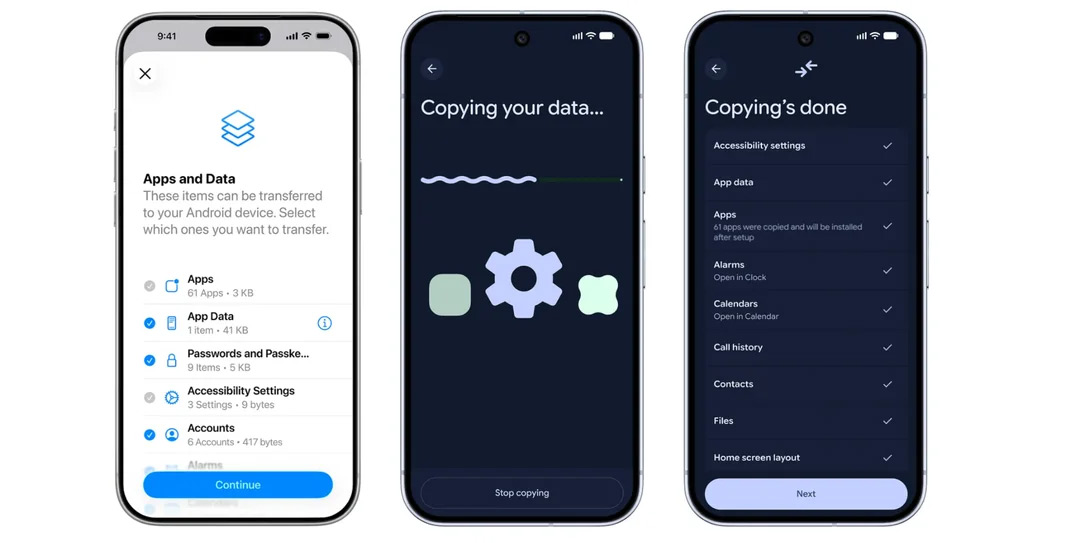
Until now, wireless migration from an iPhone has been quite limited. For example, without a cable, you could transfer contacts, calendars and photos, but things like apps, files and messages were left behind. As a result, you had to reconfigure a lot of settings manually.
With Android 17, that’s set to change. Whether you choose a cable or a wireless connection, you’ll be able to transfer virtually the same data in both cases. What’s more, you won’t need to install any extra apps or grant any complicated permissions.
The updated transfer process now supports, amongst other things:
- Apps
- Passwords and passkeys
- Wi-Fi settings
- Call history
- Files and folders
- iMessage, SMS, MMS and RCS history
- WhatsApp history
- Notes and attachments
- Alarms
- Wallpapers
- Home screen layout
- eSIM profile
- Google account
One-time verification codes (OTPs) can also be transferred. In addition, new options are available for developers to securely transfer app data between iOS and Android.
Photo albums will follow later
Almost all the new features are available immediately, but one feature is still missing. The ability to automatically transfer entire photo albums is still in the pipeline and will be added later.
According to Google, the new system has been completely rebuilt and integrated into both Android and iOS. This removes many of the limitations that previously existed with wireless transfers. The aim is to make setting up a new Android smartphone quicker and easier.
Have you got the new feature yet?
Is your new Android device compatible with the updated transfer process? If so, whilst setting up your phone, you’ll automatically be shown a QR code as soon as you indicate that you want to copy data from an iPhone. This will immediately start the new transfer process.
- Recommended read: From Android to iOS: a month with the iPhone (review)
Via Google