
Android backups take up space on your device
Google is making changes to the amount of online storage space you receive. Until now, it was mainly photos and videos uploaded to Google Photos, along with the multimedia content of MMS messages, that counted towards the 15GB storage limit (or more if you have a Google One subscription). Under the new approach, other data will also be included.
This includes, amongst other things, text messages, your call history and device settings. According to Google, this will make little difference to most users. The company expects that, as a result, the average backup will take up only around 40MB of extra storage space.
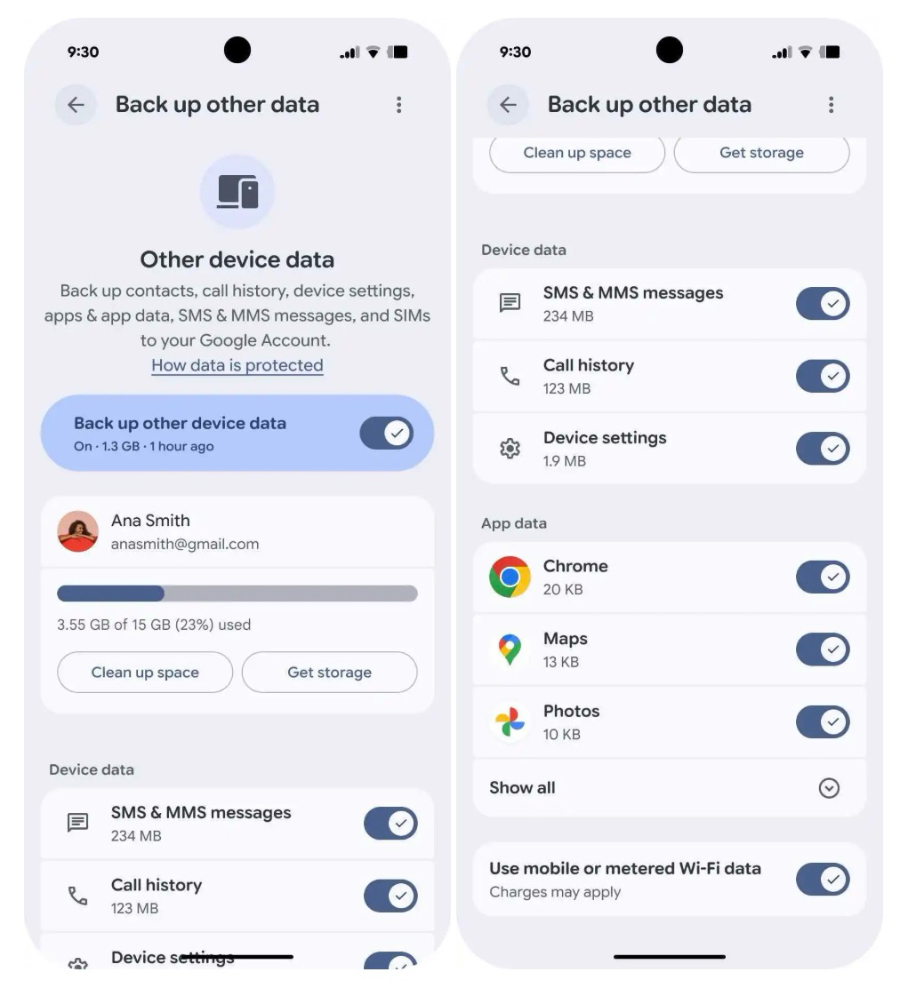
As well as the policy change, you’ll also have more control over exactly what is backed up. Google is adding new toggles that allow you to decide for yourself whether items such as text and multimedia messages, call history and device settings are included in your backup. These new settings will become available gradually over the coming weeks.
On Pixel devices, you can find these options under Settings > Accounts and backup > Google Backup > Other device data. You can also simply search for ‘backup’ in your device’s settings.
The change will first apply to new users of Android backups from 7 July. For existing accounts, the new policy will be rolled out gradually over the coming months.
According to Google, the change is intended to provide greater clarity about what data is stored and how much space it takes up. At the same time, users will have more options to decide for themselves which data they do or do not want to back up.
Via 9to5Google