New screen for settings in Maps
In Google Maps, you can now encounter a new screen for settings. While Google Maps for Android itself was previously updated with a new interface, including Material 3 Expressive, now attention has been given to this screen as well. Quite striking, since this screen has remained the same for years. The new interface for the map service's settings, is being rolled out to users in phases. So it may take a while until everyone has it visible.
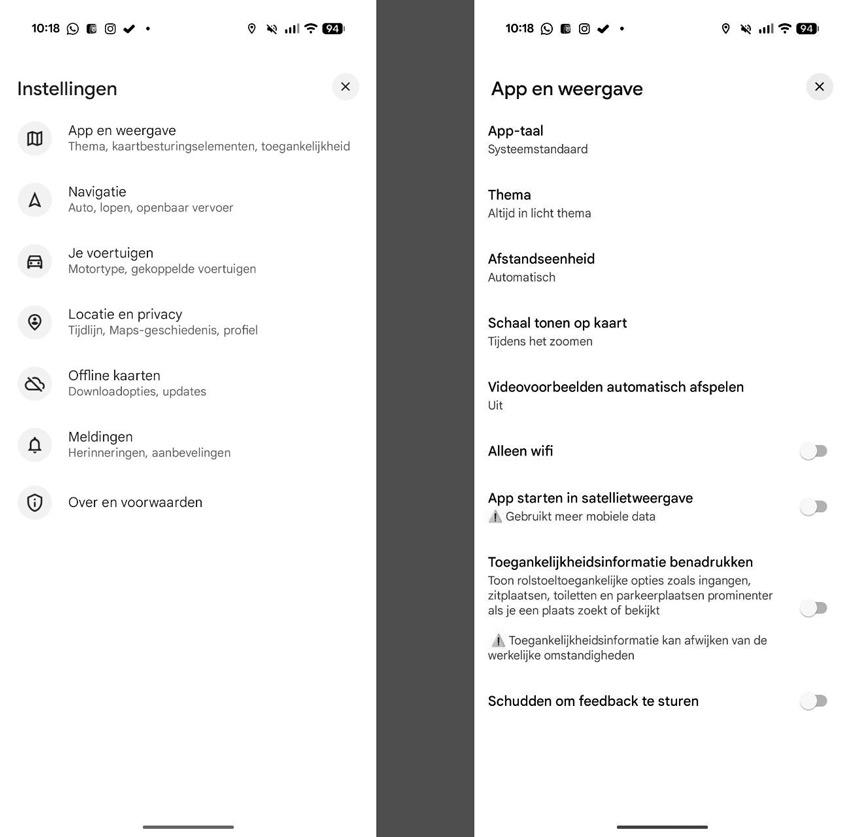
What is immediately noticeable is that the settings screen now looks clearer and less busy. On the first screen, you immediately see the different items you can choose from. These are seven choices, under which the settings are divided. The categories give you a better overview. Here, you will also find a cross in the top right corner to close the active screen. Of course, a swipe back also works, if you use gestures. Remarkably, the screen with the navigation settings has remained the same and so has not changed.
It is also notable that we do not come across the Material 3 Expressive theme in the settings. The changes will be rolled out to every Google Maps user automatically.