Change Gmail address
Until now, this was not possible and you had to create a completely new account if you wanted a different address. With this update, this becomes a lot easier. If you want to change your e-mail address, you can do so via your Google account settings. You go to 'Personal data', choose 'Email' and then select your current Gmail address. There, you will see a button to change your e-mail address. After that, you can choose a new name.
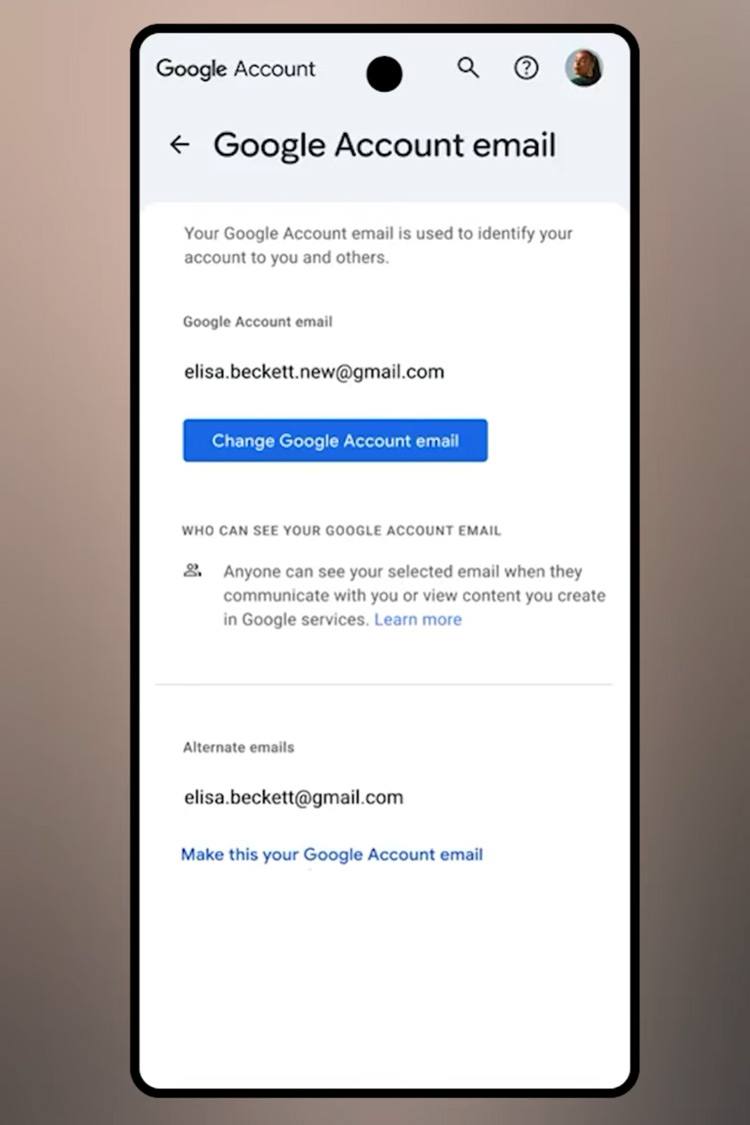
Handy detail: your old email address will remain linked to your account. That means emails sent to your old address will continue to arrive as usual. So you don't have to worry about missing messages.
However, there is an important limitation to this new feature. You can only change your e-mail address once every 12 months. So it is wise to think carefully about your new address before making the change.
As this is a phased rollout, it may take some time before everyone has access to the feature. If you don't see the option appear yet, it may help to try again later. The feature is currently rolling out in the United States. If and when it will come to other countries is not yet known, but it is expected to follow later.